I’ll be basing this of VLSM Example 1 under topic 7 in your E-learn
Nomenclature/Jargon!
Before we start, let’s recap on what what means & what is what!
| The what? | The what! |
|---|---|
| Network Portion | the bits in the ip address that does not belong to the subnet |
| Host Portion | the bits that belong to the subnet! |
| Subnet Address/Identifier | the smallest address in a subnet, used to identify a subnet when making routing rules |
| Subnet Mask | A 32 bit number that represents the network bits of a subnet with 1 and host bits with 0 This allows you to perform bitwise & on any address in a subnet to find the Subnet Identifier |
| Octet | Each 8 bit chunk in the IPv4 address is an octet! (DO NOT CONFUSE THIS WITH OCTAL) |
Steps:
- Identify the subnets
- Order the networks by decreasing size
- Find the first address of the given address-range/subnet
- Find smallest subnet size for each subnet
- Start subnetting
How 2 VLSM (fast):
1. Identify the subnets
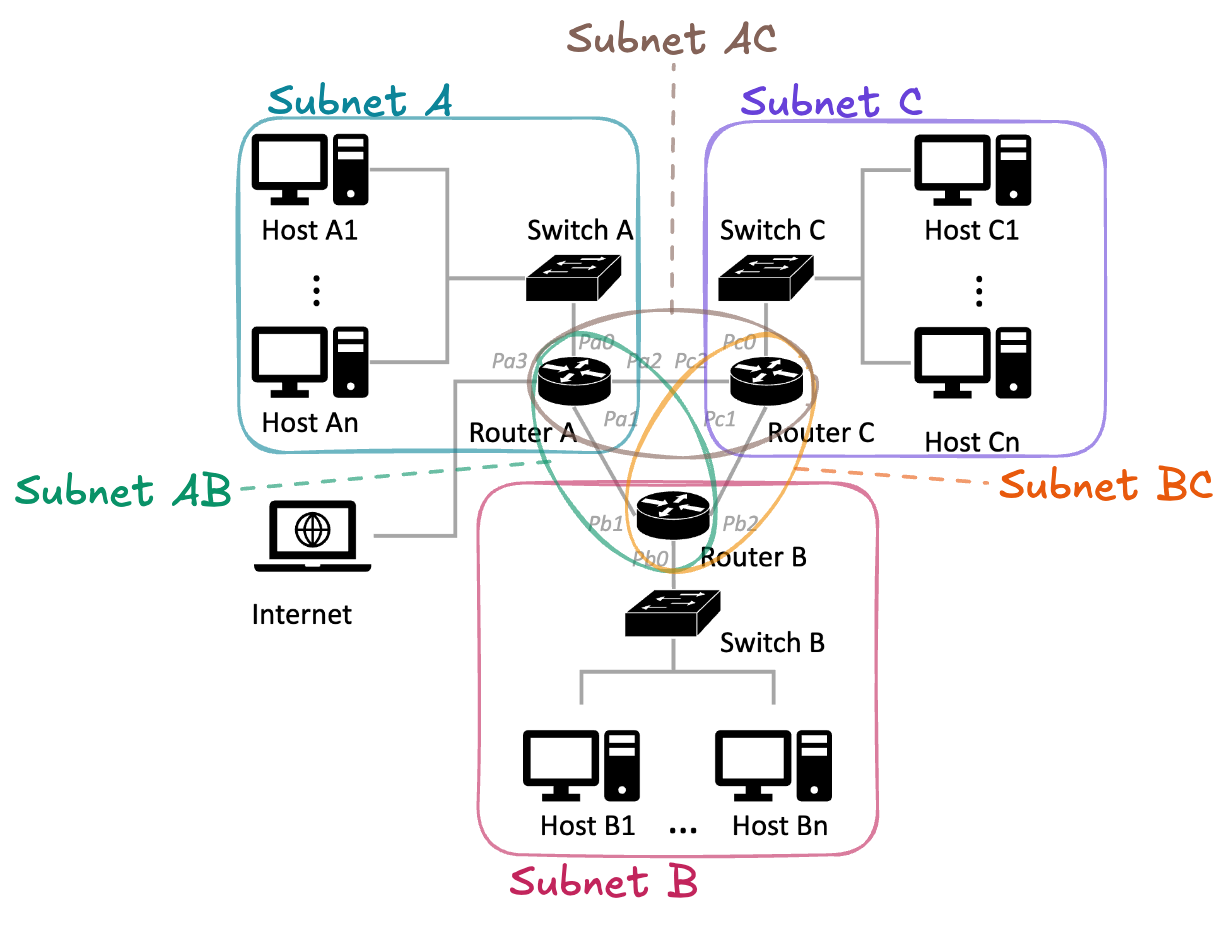
So from this we know we need the following subnets:
- A
- B
- C
- AB
- AC
- BC
2. Order the networks by decreasing size
In example 1, the number of nodes in B are 20, we’re going to change that to 50 to make things more interesting.
| Subnet | No. of Hosts | No. of Routers | No. of Usable IPs Needed | No. of Addresses Needed (Includes network & broadcast address) |
|---|---|---|---|---|
| C | 125 | 1 | 126 | 128 |
| A | 60 | 1 | 61 | 63 |
| B | 50 | 1 | 51 | 53 |
| AB | 0 | 2 | 2 | 4 |
| AC | 0 | 2 | 2 | 4 |
| CB | 0 | 2 | 2 | 4 |
3. Find the first address of the given address-range/subnet
In example 1, the address range given is “192.168.160.0/24”. That’s a little too easy.
So for this example! We’ll be using the address range → 192.168.17.0/22
- /22 → the last 10 bits of the address is our host portion.
- Meaning, the last 2 bits of 17 is within our host portion, so we should make those bits 0.
- 17 in binary:
- 10 in binary (8+4) → 1010
- 7 in binary → 111
- 1010 + 0111 = 1 0001
- or
- 16 in binary → 1 0000
- 1 in binary → 1
- 1 0000 + 0 0001 = 1 0001
- Turn last 2 bits to 0: 0001 0001 → 0001 0000. Woah! That’s 16 in decimal!
- Our first usable address is: 192.168.16.0 !!
4. Find smallest subnet size for each subnet
| Subnet | No. of Addresses Needed (Includes network & broadcast address) | Min subnet size () | Corresponding Subnet Mask | Full Mask |
|---|---|---|---|---|
| C | 128 | 128 | /25 | 255.255.255.128 |
| A | 63 | 64 | /26 | 255.255.255.192 |
| B | 53 | 64 | /26 | 255.255.255.192 |
| AB | 4 | 4 | /30 | 255.255.255.252 |
| AC | 4 | 4 | /30 | 255.255.255.252 |
| CB | 4 | 4 | /30 | 255.255.255.252 |
How to find the mask based off Min subnet size?
The stupid way:
- /24 means the whole last octet is the host portion right? so its size is 256
- If 256 → /24
- 128 → /25
- 64 → /26
- … so on (rmb! as subnet size decreases, mask INCREASES)
A logical way:
- think about it, it’s not that deep…
- lazy 2 write sry.
How to find Full Mask?
do the math or memorise :) You will need to do this in the text without a calculator.
5. Start subnetting
Quick Pointer: Network Address is ALWAYS even. Broadcast Address is ALWAYS odd. if it’s not, you’ve made a mistake somewhere.
Before we start, for brevity, I’m going to define the function: “”.
- First Usable Address of the subnet
- Minimum subnet size
Why do we -1 in the function?
- if we need 64 Addresses, …0 is included in that count.
- So, from 1.1.1.0 - 1.1.1.63 that’s 64 addresses! That’s why we -1.
| Subnet C (/25) | IPs | Calculation Step |
|---|---|---|
| Network Address: | 192.168.16.0 | First Address in the given Address range |
| Broadcast Address: | 192.168.16.127 | |
| First Usable Address: | 192.168.16.1 | Network Address + 1 |
| Last Usable Address | 192.168.16.126 | Broadcast Address - 1 |
| Subnet A (/26) | IPs | Calculation Step |
|---|---|---|
| Network Address: | 192.168.16.128 | Previous subnet Broadcast Address + 1 |
| Broadcast Address: | 192.168.16.191 | |
| First Usable Address: | 192.168.16.129 | Network Address + 1 |
| Last Usable Address | 192.168.16.190 | Broadcast Address - 1 |
| Subnet B (/26) | IPs | Calculation Step |
|---|---|---|
| Network Address: | 192.168.16.192 | Previous subnet Broadcast Address + 1 |
| Broadcast Address: | 192.168.16.255 | |
| First Usable Address: | 192.168.16.193 | Network Address + 1 |
| Last Usable Address | 192.168.16.254 | Broadcast Address - 1 |
yooo wait… We’ve reached the largest number possible in our last octet (255). Since we are able to use the last 2 digits in the next octet, we can simply carry over to our next octet.
Previous Subnet Broadcast Address + 1:
- 192.168. 0001 0000 . 1111 1111 + 1
- 192.168. 0001 0001 . 0000 0000
- 192.168.17.0
Of course, you don’t have to break it into binary to do the calculation, just understand how it works :D
| Subnet AB (/30) | IPs | Calculation Step |
|---|---|---|
| Network Address: | 192.168.17.0 | Previous subnet Broadcast Address + 1 |
| Broadcast Address: | 192.168.17.3 | |
| First Usable Address: | 192.168.17.1 | Network Address + 1 |
| Last Usable Address | 192.168.17.2 | Broadcast Address - 1 |
| Subnet AC (/30) | IPs | Calculation Step |
|---|---|---|
| Network Address: | 192.168.17.4 | Previous subnet Broadcast Address + 1 |
| Broadcast Address: | 192.168.17.7 | |
| First Usable Address: | 192.168.17.5 | Network Address + 1 |
| Last Usable Address | 192.168.17.6 | Broadcast Address - 1 |
| Subnet BC (/30) | IPs | Calculation Step |
|---|---|---|
| Network Address: | 192.168.17.8 | Previous subnet Broadcast Address + 1 |
| Broadcast Address: | 192.168.17.11 | |
| First Usable Address: | 192.168.17.9 | Network Address + 1 |
| Last Usable Address | 192.168.17.10 | Broadcast Address - 1 |
yay!