Layered Network Architecture
- Memorise and understand the slide on ISO/OSI & TCP/IP model (“Commit to memory” as prof would say)
- For the protocols, just know the ones bolded
Routing
Key points:
- Know the difference between routing and forwarding
- Not all routers route. They might just be forwarding
- Decentralised vs Centralised Routing
Decentralised
Each router sends out (broadcasts) Information of the nodes it is directly connected to. Each router then uses its own information and the information received to build its own routing table.
- Who does routing?
- Every router in the decentralised topology
- Who does forwarding?
- Every router
- Why?
- Routers belong to different entities
- No agreed upon and trusted central routing node
Centralised
Each router connects to a pre-configured address of a centralised host. This centralised host will then provide the routing table for each router. This host may be a router itself or may just be a server.
- Who does routing?
- The centralised host
- Who does forwarding?
- Every Router
- Why?
- All routers on the network belong to the same entity
- More efficient routing
- More control over the routing paths
2 Planes (Categories) of the Internet/Network Layer Protocols
Key points:
- Data Plane
- Forwards Data to addresses
- Protocols: IPV4, IPV6, ICMP
- Control Plane
- Facilitates the building of Routes
IPv4 (Data Plane)
- Classfull
- Classless (CIDR)
- No more IPV4 addresses
Classful Addressing
Instead of having variable length of network and host bits. In Classful Addressing, there are only 5 “masks”. We call them Classes. Instead of having a separate mask number, each class is differentiated by the prefix of the ip address itself.
- Class A:
0sss ssss . hhhh hhhh . hhhh hhhh . hhhh hhhh0in the first bit signifies a Class A address- 8 Network bits, 24 Host bits
- For huge networks. 24 Host bits = 16,777,214 usable addresses
- Class B:
10ss ssss . ssss ssss . hhhh hhhh . hhhh hhhh10in the first bits signifies a Class B address- 16 Network bits, 16 Host bits
- Large networks. 16 Host bits = 65,534 usable addresses
- Class C:
110s ssss . ssss ssss . ssss ssss . hhhh hhhh110in the first bits signifies a Class C address- 24 Network bits, 8 Host bits
- Too small for an enterprise. 8 Host bits = Only 254 usable addresses
- Class D & E
- I think u get the point, refer to the slides <3
Classless Inter-Domain Routing (CIDR)
It’s ur VLSM shit
IPv6 (Data Plane)
- 1 Network card can be assigned multiple IPv6 addresses
- A group of devices can be assigned a second, common IPv6 address which acts as a sort of “group broadcast”
- Anycast addresses allow multiple servers offering identical service to share the same IPv6 address
- For example, across the world all the apt package repositories can share the same IPv6 anycast address.
- When a user connects to the the anycast address, they will be routed to the nearest server.
ICMP (Data Plane)
Has a IPv4 & IPv6 version. But both are mostly identical
Carries information of the forwarding of packets. It is used to report/diagnose network communications.

Routing Algorithms (Control Plane)
- lol
Network Address Translation
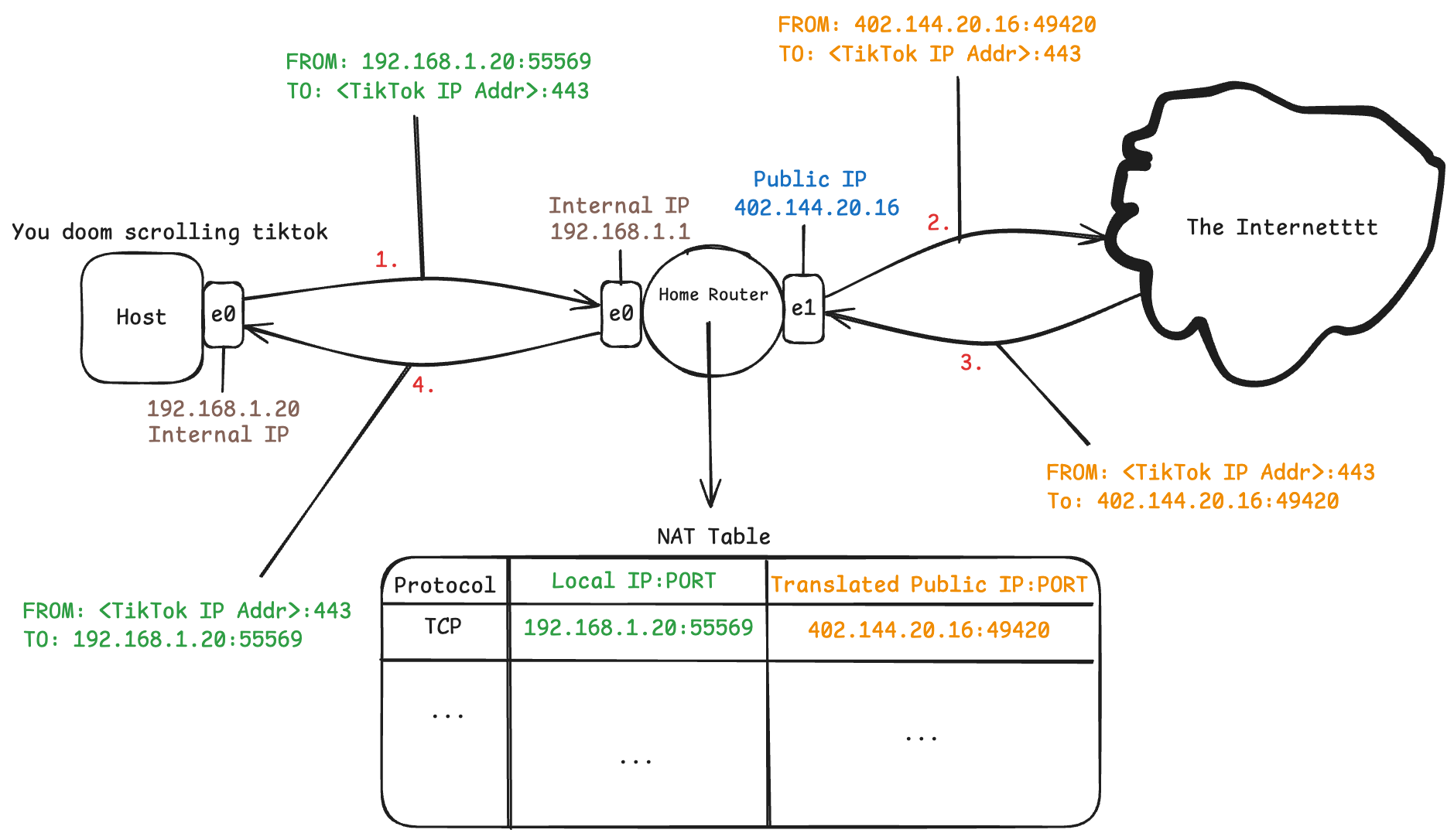
Basically it helps extend the use of a single IPv4 address.
Your ISP only gives your home router 1 public IP address. If you were to google “What is my IP?” on any device connected to your router you will notice the IP address is the same on all of your devices. This is your public IP address.
So how does that work? How can all your devices share the same IP address?.
It turns out your devices don’t excatly share the same IP address. They may share the same public IP address, but in your home network your router assigns every device a unique address typically something like → 192.168.*.*
When you then send a tcp/udp packet out to the internet, the router will combine your internal IP address and source port and map it to your ISP assigned public address with a random port number from the ephemeral port range.
lmk if ya’ll have more qns about this. then i’ll fill in more stuff
Reverse Network Address Translation (Port Forwarding)
lmk if ya’ll have qns about this. then i’ll fill in