Here’s a link to a much more in-depth and better explanation :p
Environment Variables
When we talk about the environment variables of a process, we mean the variables which are passed in from the operating system and/or the parent process. i.e. the variables in its environment!
Here’s a simple breakdown.
There’s roughly 2 categories of environment variables: Persistent & Process.
These are not real categories, it’s just shit i made up, but it helps to categorise and understand env vars.
Persistent Environment Variables
These are variables that are passed to all processes when they start (by default). They are stored somewhere in the OS which makes them persistent. There’s generally 2 types of persistent env vars → “system” & “user”. System env vars are passed to all processes regardless of user. Users env vars are specific to each user.
- Linux:
- You can find them defined in text files →
~/.bashrc(user, specific to Bash)~/.profile(user)/etc/environment(system/global)- …there’s a few others
- You can add/remove/modify these variables by directly editing the specific text files
- You can find them defined in text files →
- Windows:
- They are by default defined in the Windows Registry →
- “HKEY_CURRENT_USER\Environment” (user)
- “HKEY_LOCAL_MACHINE\SYSTEM\CurrentControlSet\Control\Session Manager\Environment” (system/global)
- You can add/remove/modify these variables using the
setxcommand
- They are by default defined in the Windows Registry →
Since env vars are only loaded into processes when they are started, changes made to the env var files/registry won’t be reflected in currently running processes! You would have to restart the process or, if it allows, reload its environment variables from a source.
Process Environment Variable
After the env vars have been copied into a process, the process may add/delete/modify its env vars as it pleases. These changes are local to the process and not persistent (not saved).
When the dealing with process env vars in a shell:
- Linux:
exportcreates/‘promotes’ shell variables to environment variables - Windows:
setcreates environment variables (to my knowledge, cmd only has env vars, shell vars r not a thing)
Environment Variables in the Shell
All processes contain and can use environment variables (recall the process diagram from week 3). However, our focus will be on how they relate to shell processes (e.g. bash)! Just remember that env vars are not exclusive to shells!
When child process are created by the shell, the shell will pass its own environment variables into the child process!
kai@kai > sh
sh $- Originally, I was in the ‘Bash’ shell
- I then launched the ‘sh’ shell from within Bash
- Now i’m in sh, inside of Bash!
- The original instance of Bash is now the parent process of the current sh process
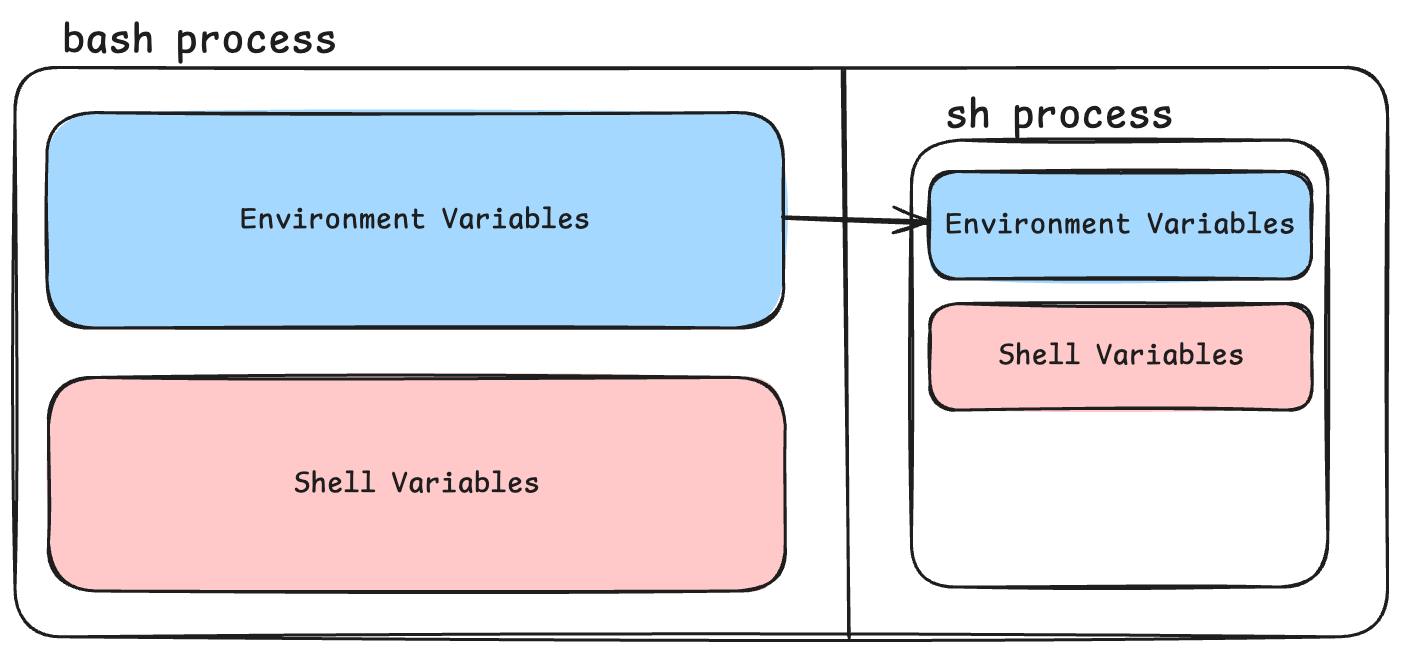
The env vars from Bash are passed down to sh!
Shell Variables vs Environment Variables in Bash (and most other unix-like cli shells)
Bash has two ‘buckets’ where it keeps variables:
- Environment variables
- Shell variables
Why are they called shell variables???
A ‘shell’ is a special program that exposes operating system functionalities to a user (you!) and other processes.
In Linux, the default shell is usually Bash (the shell you’ve been learning how to use!!).
Thus, the variables that are specific to, and used only by bash (a shell), are called shell variables!
Bash is a shell, and shells can contain shell variables !
An Example !
> S=101
> export E=101
In this example:
- the variable
Sis a shell variable - the variable
Eis an environment variable (an example of a process env var)
Shell vars:
- only available to the shell process
- not persistent
- not passed to children processes
Environment vars:
- not persistent (if created using
exportand are not added to any of the env var files) - passed to children processes