| /23 | /24 | /25 | /26 | /27 | /28 | /29 | /30 | |
|---|---|---|---|---|---|---|---|---|
| Number of Addresses | 512 | 256 | 128 | 64 | 32 | 16 | 8 | 4 |
General Routing Table for Router A
I’ll be basing this of VLSM Example 1 under topic 7 in your E-learn
Our subnets arranged by Network Address:
| Network | Network Address | Mask | Range(network to broadcast) of Forth octet(x.x.x._) in binary |
|---|---|---|---|
| C | 192.168.160.0 | /25 | 0000 0000 to 0111 1111 |
| A | 192.168.160.128 | /26 | 1000 0000 to 1011 1111 |
| B | 192.168.160.192 | /27 | 1100 0000 to 1101 1111 |
| AB | 192.168.160.224 | /30 | 1110 0000 to 1110 0011 |
| AC | 192.168.160.228 | /30 | 1110 0100 to 1110 0111 |
| BC | 192.168.160.232 | /30 | 1110 1000 to 1110 1011 |
Red: Network portion of the binary (Masked bits)
Okay! let’s build the generalised routing table for Router A
| Ports | Networks |
|---|---|
| pa0 | A |
| pa1 | B, AB, BC |
| pa2 | C, AC |
| pa3 | Internet |
We notice that 3 addresses route to the same port, so let’s make a general address that will match all of them.
- The smallest mask of the 3 is ‘/27’ and it belongs to network B
- Network B is 192.168.160.192/27
- Network B’s address range(network to broadcast): 192.168.160.192-223
- We can see that networks AB and BC which start from x.x.x.224 and x.x.x.232 respectively, do not fall into Network B’s range (obviously)
- So let’s take Network B’s address and shorten the mask from /27 to /26
- Doing so, we get the new range of 192.168.160.192-255
- We went from (/27): 1100 0000 to 1101 1111
- To (/26): 1100 0000 to 1111 1111
- Now this new range matches all the possible addresses of networks B, AB and BC!
Now for C and AC.
- Use the same steps as above
- You should get the general route: 192.168.160.0/24 which ranges from .0-255!
Something feels off… but lets try and make the routing table:
| Networks | Target Addr | Port |
|---|---|---|
| A | 192.168.160.128/26 | pa0 |
| B, AB, BC | 192.168.160.192/26 | pa1 |
| C, AC | 192.168.160.0/24 | Pa2 |
| Internet | 0.0.0.0/0 | pa3 |
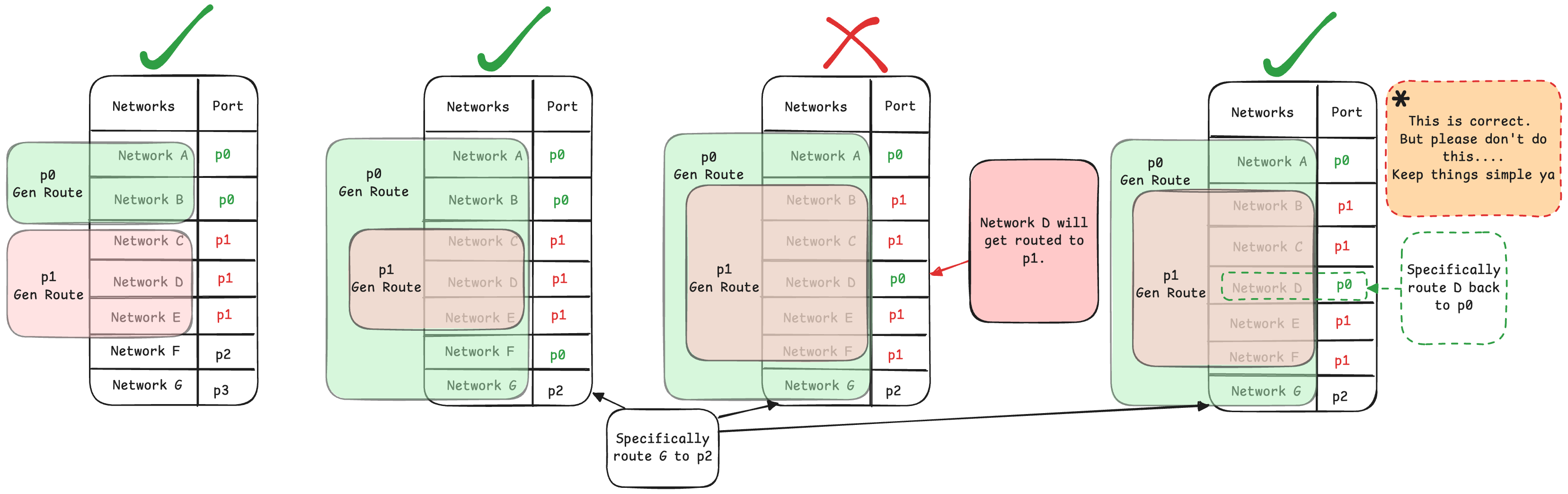
We now have 2 general addresses:
- 192.168.160.0-255 (/24) & 192.168.160.192-255 (/26)
- They overlap.
- This is not always a problem… But in this case it is. (see bellow for an example of when overlaps are okay)
- Remember that the router will choose the most specific route!
- AC’s network address is: 192.168.160.228
- Instead of following the route we want (192.168.160.0-255 (/24))
- It will follow the more specific route (192.168.160.192-255 (/26))
- and we don’t want that… So! we have to choose to get rid of one of them…
- So to maximise efficiency, we get rid of the general route that matches the least networks (C, AC)!
- Here’s a table that visualises this better
Thus, giving us:
| Networks | Target Addr | Mask | Port |
|---|---|---|---|
| AC | 192.168.160.228 | /30 | pa2 |
| A | 192.168.160.128 | /26 | pa0 |
| B, AB, BC | 192.168.160.192 | /26 | pa1 |
| C | 192.168.160.0 | /25 | Pa2 |
| Internet | 0.0.0.0 | /0 | pa3 |
This table is ordered by most specific first for the sake of clarity. But, the order doesn’t actually matter, write it in any order that u wish.
Networks: The networks routed by this Target Address
Target Addr: The Address used to match an IP and specify its route
Port: The port the route should take
An Example Where it is Okay to Have Overlapping General Routes
Here’s what the full routing table looks like for our example router D:
| Network | Network Addr | Addr Range | Port |
|---|---|---|---|
| A | 192.168.0.0/26 | 192.168.0.0-63 | pd0 |
| B | 192.168.0.64/27 | 192.168.0.64-95 | pd1 |
| C | 192.168.0.96/27 | 192.168.0.96-127 | pd1 |
| D | 192.168.0.128/27 | 192.168.0.128-159 | pd0 |
| E | 192.168.0.160/27 | 192.168.0.160-191 | pd0 |
This table is ordered by Increasing Network Address, I recommend ordering the full routing tables this way, as it makes it easier to generalise.
Let’s do the generalisation for Networks attached to pd0 (A, D, E):
- Find a general address that can encapsulate A, D and E
- We can’t use 192.168.0.0/25 because that’s only ranges: 192.168.0.0-127
- So we have to use 192.168.0.0/24. Which ranges: 192.168.0.0-255
- Find a general address that can encapsulate B & C
- 192.168.0.64/26 ranges: 192.168.0.64-127
- 192.168.0.64 → 192.168.0. 0100 0000
- 192.168.0.127 → 192.168.0. 0111 1111
- 192.168.0.64/26 ranges: 192.168.0.64-127
So! let’s make the Generalised Routing Table:
| Network | Addr | Mask | Matches Addresses in Range | Port |
|---|---|---|---|---|
| B, C | 192.168.0.64 | /26 | 192.168.0.64-127 | pd1 |
| A, D, E | 192.168.0.0 | /24 | 192.168.0.0-255 | pd0 |
This is perfectly fine! Our general address for network B & C only matches networks B & C.
Visualisations for when overlaps are ok